Week 3: Web 2.0 Tools as Teaching Resources

Web 2.0 Tools as Teaching Resources
What are Web 2.0 Tools?
 |
| Link |
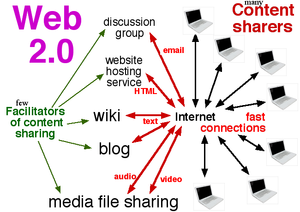
Web 2.0 tools are effective digital online tools available to both teachers and students. Web tools are no longer just research avenues to accessing information. Students are becoming active participants in their learning, collaborating with others and becoming global learners (An et al., 2006).
There are 3 types of webspace: Wikis / Weblogs / Webspaces
There are different types of multimedia tools: Audio / Video / Graphics / Texts / Animation
While undertaken the EDSE12024 Digital Pedagogies unit we were required to write a blog and set up a website. There is also a variety of multimedia tool embedded within these two links.
Website: https://sites.google.com/view/digitising-for-the-future/home?authuser=0
Blogger: https://www.blogger.com/u/1/blog/posts/8900080024519998223
There are a few barrier to utilising web 2.0 tools.
- Learning a new tool effectively. As a digital immigrant, I find technology slower to learn and incorporate into my studies. However a high school student may find it easier being a digital native.
- Technology can have technical and internet connection errors
- Online content for students needs to be safe utilised and securely accessed for their safety
How could you use Web 2.0 Tools in your teaching practice?

Link

Web 2.0 tools exploded into the market in 2020 due to the COVID pandemic as business and school tried to access their customers and stakeholders safely. Many new platforms immerged as old ones adapted to be more inclusive. There are still the old favourites that still work well like PowerPoint. Canva has worked well for me professionally, academically and personally. During 2020 it added on an extension for teachers and students to access free content that businesses have to pay premium for.
During 2021 I studied Digital Technologies and we had the opportunity to play with a variety of online tools.
Include a range of tools and their application in your classroom environment.|
ICT
Tool |
Who
will use it |
Where
will it be used |
SAMR |
Bloom's
Taxonomy |
Pedagogy
behind the choice |
|
Presentation Prezi / Powerpoint |
The teacher will set up a presentation with key terminology and a video on the topic |
Students can view it at home on their device |
Substitution |
Remembering Understanding |
Flip classroom to refresh knowledge and recap knowledge |
|
Nearpod |
Teacher
to set up interactive tools for formative assessment of knowledge |
Students
to use in the classroom for formative assessment. |
Augmentation |
Understanding Applying |
Explicit
teaching of gaps in knowledge |
|
Flip Grid |
The teacher will ask an investigating question. |
Students can do a short video at home of the research they have done in the real world. Up load into this group format. Students can collaborate and comment on peer’s work. Teacher can monitor responses. |
Augmentation Redefinition |
Applying Analysing Evaluating |
Authentic learning Collaboration of peers |
|
Wiki |
Students
in groups. |
Students
on completion of their design brief can upload their project ideas, pictures, patterns, to share with the current cohort, or as a teaching resource for next year. |
Substitution |
Remembering |
Collaboration of peers |
|
Blog |
Students will create a visual display of their progressive work as they progress through the design brief |
Students can create an individual presentation during
class hours or at home. |
Modification Redefinition |
Evaluating Creating |
Student-centred learning |
Curated Collection
Abode Spark / Abode Express
I created this abode spark to demonstrate how to use this ICT as an inspiration into a possible design brief.
Mind Map
I created this mind map in bubbl.us of the connections between me personally and the Home Economics unit.


Comments
Post a Comment